The MassMailer 2.52.125 patch has the following new features & enhancements. You can find the previous releases at this link.
New Features & Enhancements
MassMailer Queued Outreach Launch
Ability to launch queued outreaches for a selected date range using the From Date and To Date filters under MM Setup > Tools.
Unsubscribe Page Settings Synchronization
Changes made in Default Unsubscribe Page Settings are automatically reflected in the Global Unsubscribe and Group Unsubscribe pages.
Subuser Region Selection
A Subuser Region field was added under MM Setup to support region-specific user provisioning for EU customers.
Salesforce List View and Report in Outreach Wizard
Ability to select a Salesforce List View or a Salesforce Report as a Target Audience source in the MassMailer Outreach Wizard.
Split Campaign Enhancement
Ability to enter comma-separated member counts.
Sub-campaigns are created automatically based on the specified values.
Global Unsubscribe Signup Form URL
A read-only URL field was added under MM Setup > Tracking Settings > Signup Form Settings to view the Global Unsubscribe Signup Form URL.
Hide Default Email Preferences and Global Unsubscribe Options
Ability to hide the Default Email Preferences and Global Unsubscribe options from the Outreach Wizard dropdown.
Task Creation for Email Activity Logging
A Salesforce Task is created automatically when Email Message logging is disabled.
Ability to include or exclude the email body in the Task description.
Email Preference Center Permissions
Role-based visibility controls restrict access to specific Email Preference Centers based on user permissions.
Additional To Default Settings
Additional To now works consistently with CC and BCC.
Ability to configure default Additional To email addresses under Setup.
Global and Group Unsubscribe Tile Width
The tiles were widened so the complete text is visible and properly aligned in Tile View.
Preserve Unsubscribe Group Order
The last customized group order is retained when the toggle is disabled.
The order is restored when the toggle is enabled again.
Download Recipients from Outreach Wizard
A Download button was added under Target Audience to export recipients from the selected List View.
MassMailer List View Download Visibility
Ability to control Download button visibility based on the configured Role, Profile, and User selections.
Dynamic Fields in Email Status List Table
Ability to configure and display dynamic fields in the Email Status List table, based on the object used for sending emails.
Base List View Field Enablement
In Create From Base List View, the dependent fields stay disabled until a valid Base List View is selected.
Template Builder Export Enhancement
The Export HTML button was replaced with Export.
A multi-select popup supports the HTML, JSON, Text, and PDF formats.
Tooltips for Tracking Settings
Tooltips were added to the Disable Email and Auto Populate Email toggles under MM Setup > Tracking Settings.
Template Builder Accessibility/Smart Check
Potential issues or errors are identified and displayed while creating email templates.
CC, BCC, and Additional To Character Limit
The CC, BCC, and Additional To fields now support entries longer than the previous 255 characters.
Additional To in Simple Send Via MM
The Additional To field was added to the Simple Send Via MM component.
Ability to select a default email field and change the selected email field.
Visible to Group in MassMailer List View
A Visible to Group option was added under Restrict Visibility settings to share List Views with specific groups.
Daily Email Notification Recipients
An Enter Emails to Notify field was added under Daily Email Notification to specify custom email recipients.
This is consistent with the existing Purge Job Email Notification functionality.
Dynamic Unsubscribe Page Feature
Ability to create and manage multiple Unsubscribe Pages under MM Setup > Tracking Settings, instead of a single page.
Include MassMailer Job Status Records in Purge Jobs
Both Basic and Advanced Purge Jobs now include MassMailer Job Status records.
This helps with data cleanup and storage management.
MassMailer Dashboard as Default Home Page
The MassMailer Dashboard is now the default landing page when users open the MassMailer Lightning App.
Standardize Unsubscribe Content, Links, and Landing Page HTML
Unsubscribe content, link labels, redirect page URLs, and landing page HTML were standardized for a more consistent experience.
Replace Hidden Page URL Across MassMailer
massmailer.io/hiddenpage was replaced with massmailer.co/hiddenpage across email references and relevant areas of the codebase.
Catch-All to Suppressions Enhancement
The Catch-All to Suppressions field now defaults to TRUE for new records.
The field label was renamed to Add Catch-All to Suppressions across the system.
Restrict Exporting and Downloading Options
New UI controls let customers restrict exporting and emailing reports from Outreach Wizard runtime results.
The same controls apply to downloading MassMailer List View results.
Export MassMailer Templates to PDF
Ability to export templates as PDF files from both the Basic and Advanced editors.
The original formatting, images, and layout are retained.
Add Basic Editor Option to Template Builder
The Basic Editor option was added to the MassMailer Template Builder.
The Advanced Editor remains the default, consistent with the Outreach Wizard.
Additional To in Developer API
The MassMailer Developer API now supports the Additional To field for specifying additional email recipients.
Group Unsubscribe Description Field Enhancement
The Group Unsubscribe Description field now uses a Long Text Area to support longer descriptions.
MassMailer Email Message History on Basic Purge Tab
The MassMailer Email Message History section was added to the Basic tab for both Scheduled Purge and Manual Purge.
Rename Email Preference Groups Settings
Email Preference Groups was renamed to Email Preferences Center Settings.
Email Preference Group was renamed to Email Preference Center Name, for clarity and consistency.
Configure Object Visibility in Select Object Dropdown
Added the option to restrict object visibility in the Select Object dropdown so that users can view and select only the Account object or configure which objects should be visible based on their requirements.
MM List View Download Button Visibility Control
The Download button on the MassMailer List View was enhanced to support visibility control based on Role, Profile, and User selection, allowing access for users beyond Admins.
MM Email Verification – Automatic File Deletion
The uploaded bulk email file is now automatically and permanently deleted from the server after the user downloads the email verification results, improving data privacy, security, and storage management.
How to upgrade?
STEP 1:
- Your Salesforce Administrator can upgrade by clicking on this link.
- Please make sure you install it for all the users.
- Please ensure you upgrade in a sandbox before upgrading in production.
- If you don't have a sandbox plan from MassMailer, or are not sure about it, please get in touch with the support team.
- If you have a MassMailer sandbox plan and are unsure how to configure it, please watch this video.
STEP 2:
NOTE: If you are on any 2.52 patch, you do not need to follow the steps below. Please follow them only if you are upgrading from an earlier version, such as 2.50. After the upgrade, please wait at least 15 minutes.
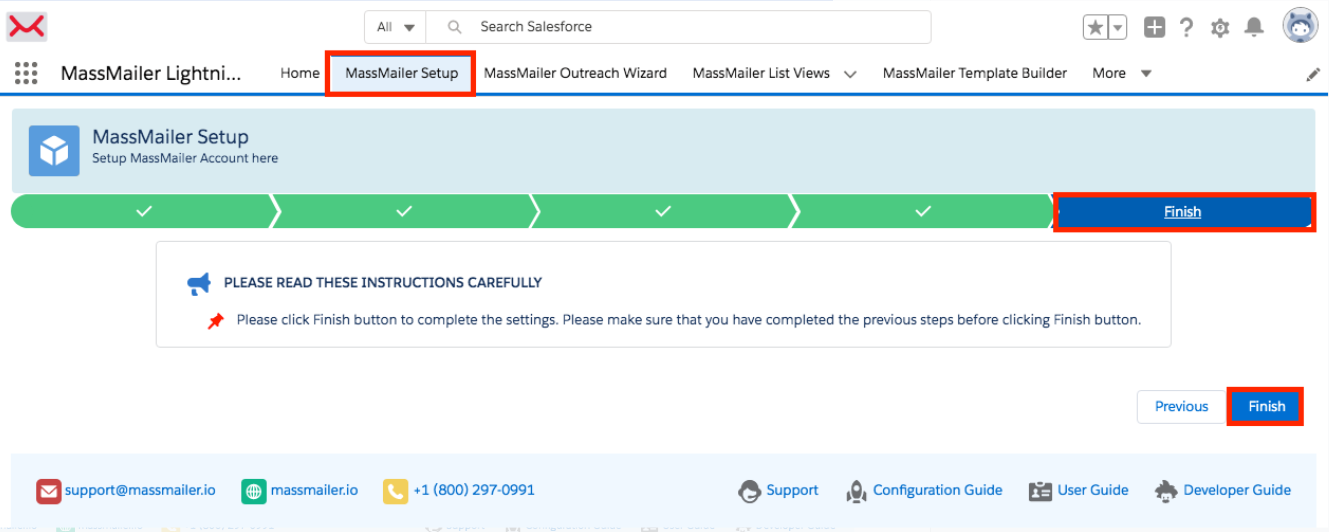
Once the app is installed, please make sure that you navigate to the 'MassMailer Setup' tab, click on the 'Finish' sub-tab, and Click on the 'Finish' button.
This should complete the upgrade process. Please make sure you test your use case scenarios after the upgrade.